You checked your rankings, looked at your AI mentions, and found a few things worth improving. A week later, it is surprisingly hard to remember which change you chose, what has been done, and what still needs your attention.
That is the problem the new Bloomiro Action Center is built to solve. It keeps the work you choose to act on visible to you, your team, and your connected AI agent, so you can carry it forward instead of starting the conversation again.
What is an SEO and AI visibility workflow?
An SEO and AI visibility workflow connects a finding to a specific change and a later check of the result. You decide what matters, make the improvement, review it, and look again at the evidence.
For Google search, that evidence might be impressions, clicks, and the queries bringing people to a page. For AI answers, it might be whether your brand or page appears in the buyer questions you track. These are different signals. Improving one does not automatically improve the other.
The useful question is: what should we do next, and how will we know whether it helped?
Choose one improvement worth following through
A long list of suggestions is easy to generate. Choosing the next useful change takes more care.
Start with a page or question that matters to your business. Perhaps your pricing page gets impressions but few clicks. Perhaps competitors appear in the AI answers you track, while your product is missing. Ask what evidence could explain the gap before deciding what to change.
You can ask Actions:
Which page has a useful opportunity right now? Show me the evidence and suggest one improvement.
Actions works with the sources connected to your Bloomiro project. If the data is missing or too old, that should be part of the answer, not something hidden behind a confident recommendation.
Once you choose a change, keep the task small enough to act on. “Improve visibility” is too broad. “Clarify who the pricing plan is for” gives you something concrete to review.
Keep your agent up to date as the work changes
Useful work rarely follows the first plan exactly. You might find that the page already answers the question, that a claim needs evidence, or that the draft is aimed at the wrong buyer.
Tell Actions what changed:
Update the pricing task. Keep the current headline, but make the plan differences clearer. The next step is to review the replacement paragraph.
You can also edit the card yourself. The brief, next step, status, and saved result give your agent a current starting point when it reads the task again.
This is why updating one task is usually more useful than creating five follow-ups. You can see how the work is developing without searching several chats for the latest version.
See what is underway and what needs you
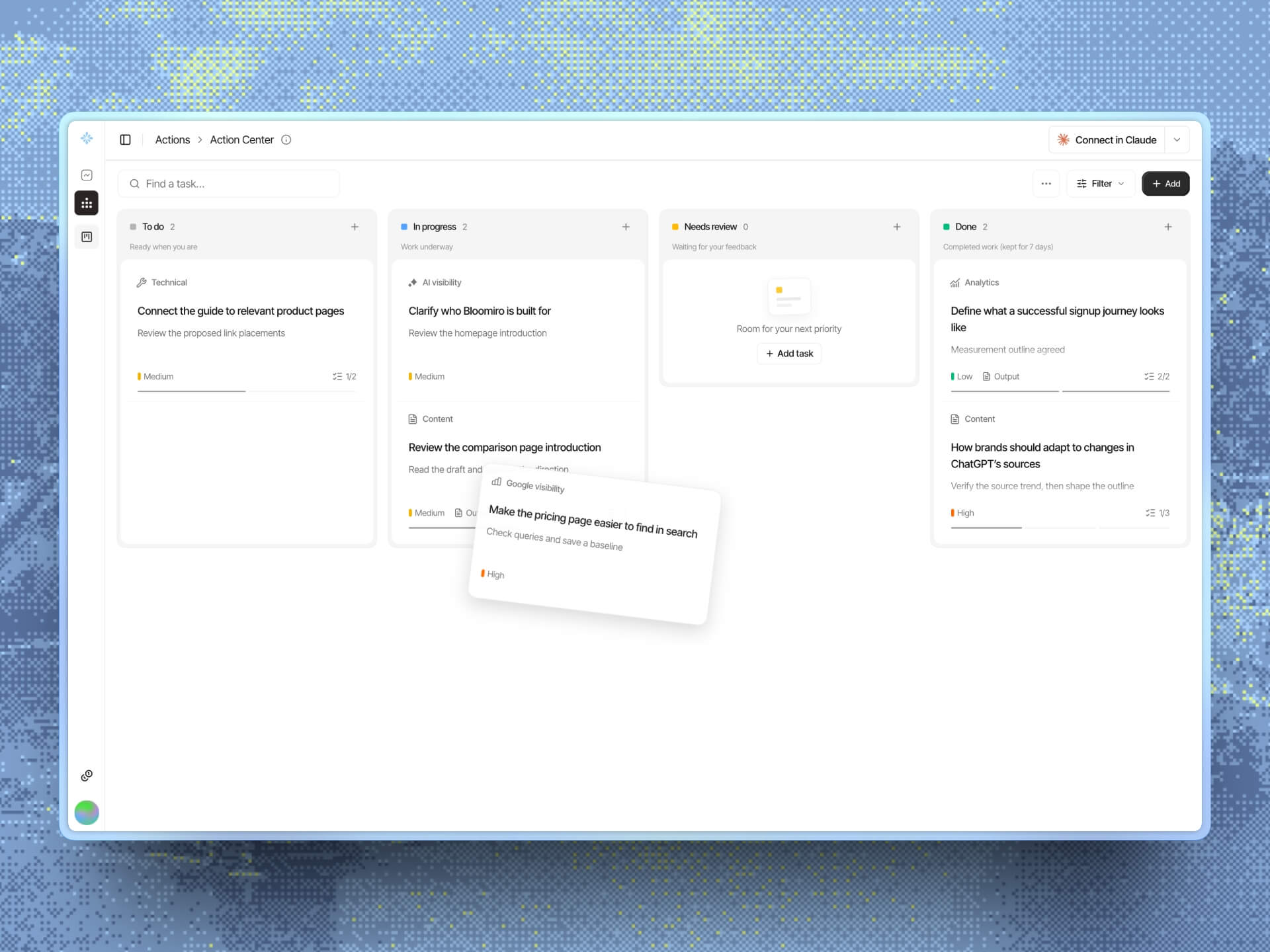
Action Center lives in Actions, alongside the chat where you work with AI. Insights remains the place to inspect your data and results.
The board has four stages:
- To do: work you have chosen but not started.
- In progress: work is underway, with a clear next step.
- Needs review: there is a result or decision ready for you.
- Done: the agreed work is complete.
You can ask, “What needs my review?” or “Continue the task we already started.” An agent connected through Bloomiro MCP can read and update the same tasks from its own workspace. It needs to read the current board; it does not automatically know every change you make.
The board is shared with project members, while Actions chats stay private. Moving a task does not publish a page or change your website. You stay in control of supported changes and approvals.
Check whether the change helped
Finishing a task and improving a business result are not the same thing.
After a change has shipped, compare the relevant evidence with your earlier baseline. For a search improvement, look at the page and queries you intended to help. For AI visibility, recheck comparable prompts, models, and locales. Also look at what visitors do next, where that data is available.
If the evidence does not improve, record that honestly. It may mean the change did not help, the original explanation was wrong, or there is not enough data yet. Ask Actions to investigate before opening another batch of tasks.
Google's guidance for AI features in Search still emphasizes helpful content and foundational SEO. A task board cannot guarantee rankings, citations, or sales. Its value is helping you follow through on useful changes and keep track of what you learn.
Keep longer-term results in a document or report. Done tasks remain in Action Center for 7 days before deletion, so save any output you want to keep.
Start with the work you already care about
Open Actions and ask:
Look at my existing tasks first. What is the most useful thing to finish next, and what do you need from me?
If you are starting without a task, use Insights to inspect your data or ask Actions a question. Choose one improvement together, then ask Actions to track it.
New to Bloomiro? Check your site's visibility to find a starting point, or open your workspace to continue work already underway.
Already using the old Action Center? The changelog explains where to find your legacy work and the October 20 deadline.