Updated
Your Business, Now in ChatGPT: What It Means and How to Claim It
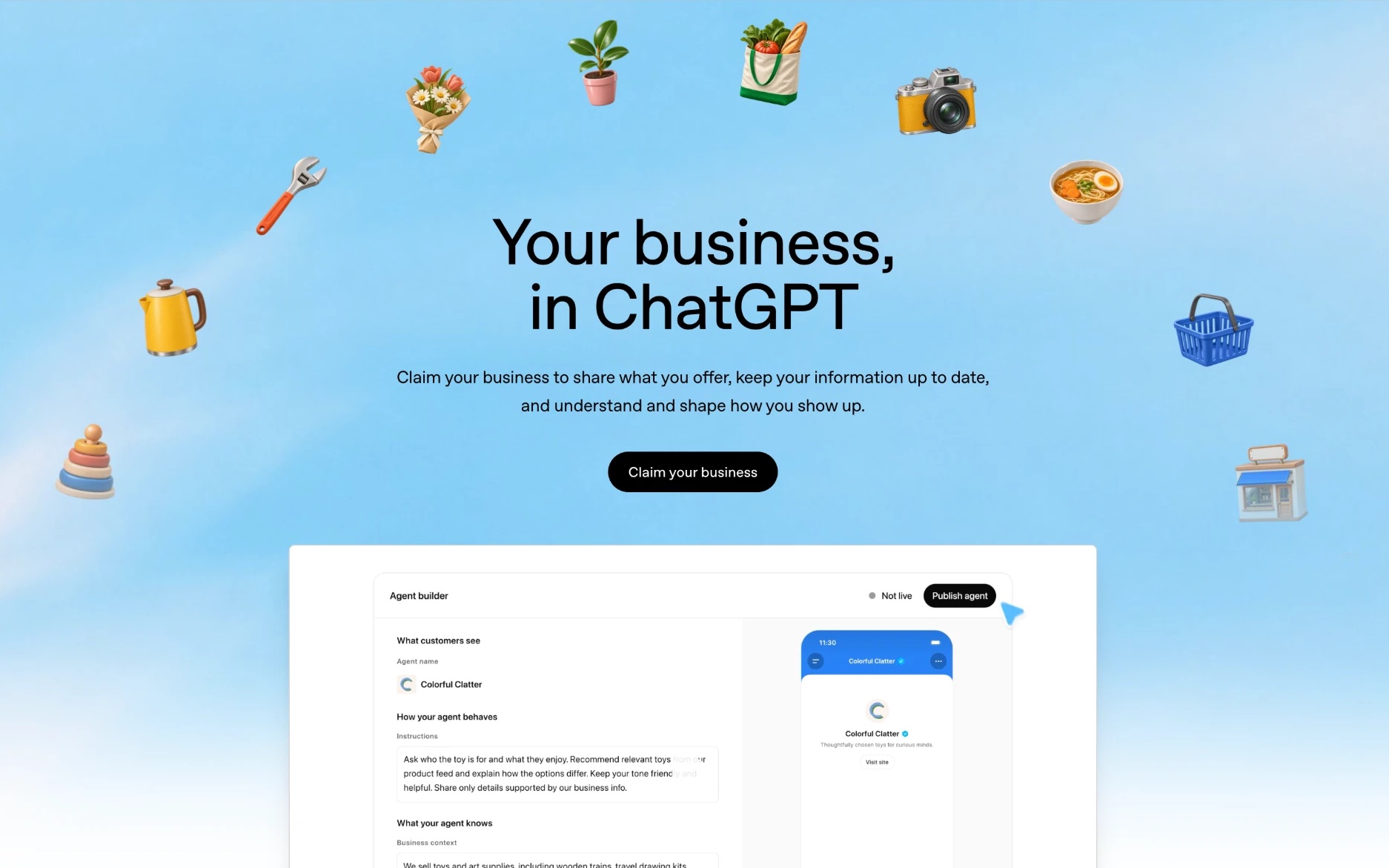
Short answer: On November 10, 2026, OpenAI launched Businesses in ChatGPT. Any eligible business with a website can now claim its profile in ChatGPT through Business Hub, get a blue check, fix its details, upload a product feed and see how often ChatGPT mentions it. Claim yours today. OpenAI lists no fee to claim, and 1.2 billion people use ChatGPT every week.
But claiming is step one, not the whole job. Business Hub shows you a count of mentions. It doesn't show you the questions people asked, who ChatGPT recommended instead, or what Gemini and Google's AI answers say about you. That's still where most businesses win or lose.
What OpenAI actually launched
Three things, in beta:
- Business Hub. A place to claim and verify your business, then update your key details. Retailers can add a product feed with prices and stock.
- Insights. Aggregated numbers on how people engage with you in ChatGPT: mentions, website clicks and "discovery topics".
- Business Agents. A chat agent built on your own information that customers can talk to from your profile. For now, only eligible US ecommerce and online service businesses get one.
Once you're claimed, a blue check shows on your profile. When ChatGPT names your business in an answer, people can click through to that profile, visit your site, or start a chat with your agent if you have one.
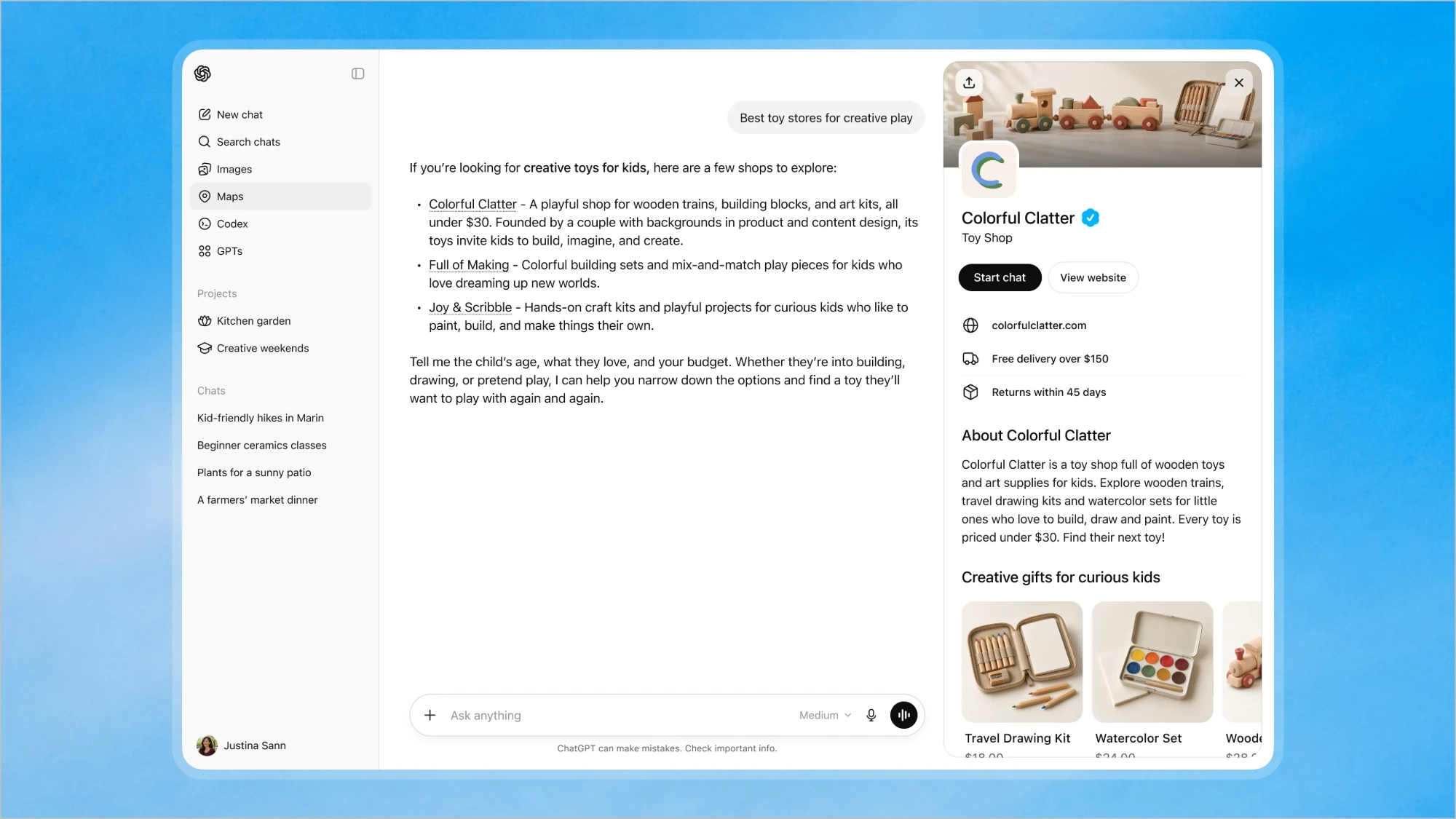 Image: openai.com. A business profile opened from a ChatGPT answer.
One thing to notice: the profile only shows up after ChatGPT names you in the answer. Claiming makes your profile better, but you still have to earn the mention.
Is this the Google Business Profile moment for AI?
Pretty much. Think back to Google Maps in the early 2010s. Businesses that claimed their listing, filled it in and kept it current got calls. The ones that ignored it had wrong opening hours, old phone numbers and a competitor's photo on top. A whole industry grew up around fixing that.
ChatGPT is at the same starting line now. Except people don't type "plumber near me" and scroll. They ask "who's a good emergency plumber in Leeds that doesn't charge a call-out fee" and get two or three names. If you're not one of them, there's no page two.
So no, this doesn't make SEO or AI visibility work pointless. It makes it more visible to business owners that ChatGPT is now a place customers find you, and that you can influence it.
How to claim your business in ChatGPT
Based on OpenAI's claim page:
- Go to Business Hub and claim your business. You need to own it or be authorized to represent it.
- Verify it. OpenAI runs verification and integrity checks. For now, claiming is for eligible businesses with a website.
- Update your details. Make them match your website and your Google Business Profile word for word: name, category, location, services, policies.
- Add a product feed if you sell products. Prices and availability come straight from it.
- Shopify store? Connect it from Business Hub or your Shopify admin. Your catalog flows in automatically, and verification is quicker.
- Build an agent if you're eligible. Write its guidelines carefully, test it, then publish.
If you already work with an OpenAI account manager or run ChatGPT ads, they can claim it for you.
Who can claim right now
| Claim your profile | Business Agent | |
|---|---|---|
| Ecommerce store in the US | Yes, if eligible | Yes, if eligible |
| Online service in the US | Yes, if eligible | Yes, if eligible |
| Local service (plumber, dentist, gym) | Yes, if eligible and you have a website | Not yet |
| Business outside the US | Yes, where ChatGPT is offered and you're eligible | Not yet |
OpenAI says it plans to expand both to more markets and categories over time.
What to put in your profile (this is the part most people will get wrong)
Everything ChatGPT says about you on your profile, and everything your agent says, comes from what you write. Most businesses will paste in their homepage slogan and move on. Don't.
- Say what you do in plain words. "Wooden toys and art kits for kids aged 3 to 8, all under $30" beats "Inspiring tomorrow's creators".
- Name who it's for and where you work. City, area, service radius, or countries you ship to.
- Add the facts people ask about. Prices or price ranges, delivery times, returns, booking, insurance, opening hours.
- Keep it the same everywhere. If your site says "heating engineer" and your profile says "plumbing company", you've made ChatGPT's job harder.
- Treat your product feed like SEO. Clear titles, real prices, stock that's actually up to date. For a store, the feed may now matter more than another blog post.
What Business Hub insights show, and what they hide
This is the big question for anyone who wants to grow, not just show up.
| Business Hub | What you still can't see there | |
|---|---|---|
| How often you're mentioned | Yes, as a total | Which questions triggered the mention |
| Website clicks from ChatGPT | Yes | Which answers or wording drove them |
| Discovery topics | Themes where your site is cited | The exact prompts, and topics where you're missing |
| Competitors | No | Who ChatGPT recommends instead of you |
| What ChatGPT says about you | No | The answer text, tone and any wrong facts |
| Sources behind the answer | Only your own site's citations | The lists, reviews and Reddit threads shaping it |
| Conversations and agent chats | No, by design | Which chats turned into sales |
| Small businesses | Only above a privacy threshold | Low-volume businesses may see little or nothing |
| Other AI engines | No | Gemini, Google AI Overviews and AI Mode, Perplexity, Copilot |
OpenAI is clear that it doesn't share users' conversations and only shows insights when there are enough of them to stay private. That's the right call for users. But it means the dashboard tells you how much, not why.
Discovery topics are a free content plan
Use them. If ChatGPT already cites your site for "toddler-safe wooden toys", write the best page on the web for that topic and the questions around it. Just remember they only show where you're already cited. The topics where your competitors get picked and you don't are exactly the ones you can't see there.
Claiming doesn't move you up
In OpenAI's own words: "Claiming does not guarantee higher placement or sales." ChatGPT keeps making its own recommendations. Those still come from what it finds on the web: your pages, reviews, comparison lists, Reddit, YouTube. We wrote about where AI answers get their sources if you want the details.
Do you still need an AI visibility tool?
Honest answer: it depends on what you want.
Business Hub alone is enough if you only care about ChatGPT, you just want your details to be right, and you're happy knowing a rough mention count.
You need more if you want to grow. That means knowing:
- Which questions your customers ask, and whether you're named in each one
- Who wins instead, and what pages or reviews they have that you don't
- What the answer actually says about you, including mistakes
- Which sources ChatGPT read before answering, so you know where to get listed
- What the other engines say. Lots of people never open ChatGPT. They see Google's AI Overview on top of their search, or ask Gemini on their phone.
- Whether ads show up for your category, and who is running them
Think of it like Google. Your Google Business Profile shows calls and views. It doesn't tell you where you rank for "dentist in Bristol" or who's above you. You needed both. Same here.
That's what Bloomiro is for. You pick the questions your customers ask, and Bloomiro checks ChatGPT, Gemini, Perplexity, Copilot and Google's AI answers on a schedule. You see the full answer, who got named, which sites were cited, whether there were ChatGPT ads, and a short list of what to fix next. It also connects Google Search Console, so your SEO and AI visibility live in one place.
Use Business Hub to fix what ChatGPT knows about you. Use Bloomiro to see where you're losing and why. Try it free, or run the free visibility check first.
A quick word on Business Agents
If you're a US store or online service, you can now build an agent that answers questions with your products and policies, using rules you set. You can also sponsor it, so a ChatGPT ad opens a chat with your agent instead of sending people to your website.
It's early. Businesses can't see the agent chats, so nobody knows yet how many turn into sales. Worth testing if you're eligible, but your profile, your feed and how often you're named matter far more right now.
What to do this week
- Claim your business in Business Hub and get verified.
- Rewrite your details in plain words, matching your site and Google profile.
- Upload or clean your product feed if you sell products.
- Check ChatGPT can reach your site. Don't block OAI-SearchBot.
- Write down 10 to 20 questions your customers ask and check who gets named. Here's how.
- Get listed where ChatGPT looks: the comparison lists, review sites and directories that show up for your category.
- Track it every week, across ChatGPT and the other AI engines, so you know if any of it worked.
Should you be scared of this launch? No. It's the clearest sign yet that AI answers are a real way customers find businesses. The ones who act early will look like the Google Maps early adopters ten years from now.